Overview

A surveyor's site visit might take a few hours — but that was only the beginning. Manual measurements meant paper sketches, a drive back to the office, and calculations that could take days before a customer received their heat loss report. The goal was to collapse that entire tail of work into the visit itself: a tool surveyors could use on-site, on their phone, and walk away with a completed report in hand.

Bald Man

Design challenge

The central tension of this project was one of context. Surveyors are standing in a stranger's living room — time matters, interruptions matter, and going back for a second visit is not an option. But a heat loss calculation is only as good as the data behind it. Skip the wrong input and the report either fails or becomes unreliable.

The design problem was therefore less about the interface and more about a set of prioritisation decisions: which data was truly essential to capture on-site, which could be deferred or filled in later, and where could sensible defaults do the work so the surveyor didn't have to.

Designing for data quality you can't recover later

A scan that captured a room incorrectly couldn't be edited after the fact — not on mobile, not in the web app. The 3D model was the source of truth, and once uploaded it was fixed. This meant quality had to be caught at the point of capture, not corrected downstream.

We approached this in two stages:

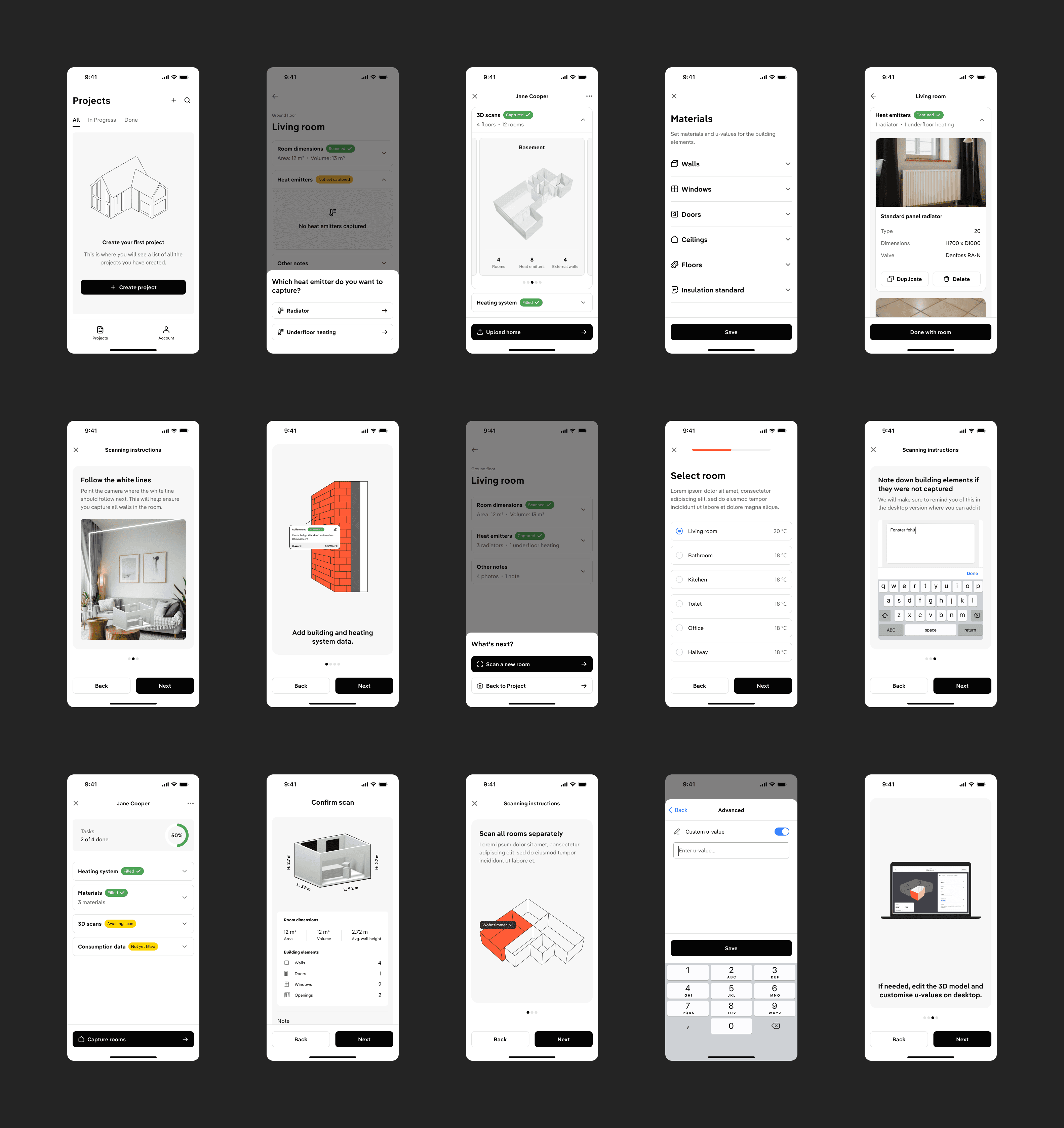
  1. During the scan itself the camera actively monitored conditions. If the surveyor was moving the phone too fast, or the room was too dark, a message appeared on screen in the moment.

  2. After the scan completed the surveyor was shown a confirmation screen with a 3D model of the room, its dimensions, volume, average wall height, and a breakdown of recognised building elements. They could verify that everything looked right before moving on. If something was off, they could retake the scan immediately. If it looked good, they continued to the next room.

This confirmation step was load-bearing. Because there was no edit mode, the preview wasn't just informational. It was the only opportunity to catch a bad capture before it became a permanent gap in the report.

Making requirements visible without making them blocking

Materials – the specification of walls, windows, and doors facing external air – meaningfully improve the accuracy of a heat load calculation. But requiring surveyors to fill this in before they could proceed risked creating friction at the worst possible moment. The solution was to surface it as a nudge rather than a gate. The app's main project overview showed the status of each major task: Heating system, Materials, 3D Scans, Consumption data, all with clear indicators of what was filled and what wasn't. The scan upload, which was the most critical on-site action, was never blocked by it.

Grounding defaults in domain knowledge

During the room-by-room scanning flow, surveyors had to identify each room they were capturing. Working with the team's energy domain expert, we identified that room temperatures could be pre-populated using recognised German building standards. Surveyors could override these if needed, but in most cases the defaults held — removing a decision that didn't need to be made in the moment.

Together these decisions shaped a flow that felt lightweight despite capturing a significant amount of structured data. The surveyor's mental model was: scan the rooms, upload, done. Everything else was either handled for them or available to complete when they had more time.

Outcome

The tool shipped to the App Store and was tested on-site with real energy surveyors. The full user journey, from house data entry through room-by-room scanning to web app upload, was delivered, including the final PDF report generation that was the primary goal of the project. What previously took days of back-and-forth was compressed to roughly 30 minutes to an hour on-site.

Reflection

After I left, the company pivoted away from the 3D scanning approach. That's worth sitting with. The tool worked, but working isn't enough if the market condition it depends on hasn't materialised.

We were targeting the German market, where regulatory changes had created a real opening for the green energy mission we were building toward. But our customers were businesses whose end clients were homeowners, and homeowners weren't yet demanding heat loss reports in the numbers needed to make the tool a priority. Without that pull from the end consumer, there wasn't enough pressure on installers and surveyors to adopt a new way of working, however much faster and more accurate it was.

It taught me something specific about designing in climate tech: you can be solving a genuinely important problem, with a well-designed tool, and still be early. Regulatory shifts can open a window, but they don't guarantee the demand follows immediately. That's a different kind of constraint than I'd encountered before, not a UX problem, not a technical one, but a market timing problem that no amount of good design can fully overcome.

© Other Creative Works
(Chasing light & moments)
Photography
© Other Creative Works
Photography
© Other Creative Works
Photography

Curious

Senior Product Designer

Creative

Observer

Designing intuitive products at the intersection of systems thinking and human experience.